
FESCO Online Bill
Struggling to get your FESCO bill on time or confused about how to check it? Don’t stress! With https://iescoebill.com.pk/fesco-online-bill/, you can easily view your FESCO Online Bill in seconds using your 14-digit Reference Number or 10-digit Customer ID. This article explains everything you need to know, like how to download or print your bill, FESCO’s services, the areas it covers, peak electricity hours, and payment options. Say goodbye to late bills or confusion and get all the info to manage your electricity bill smoothly.
How to Find a 14-digit Reference Number?
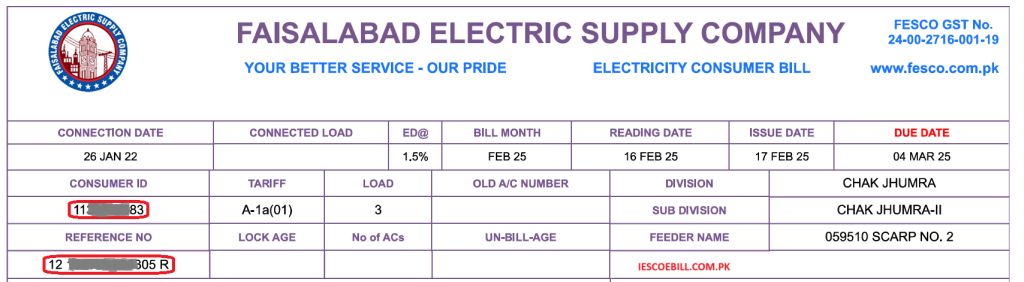
To check your bill online, you need your 14-digit reference number. It’s like your bill’s ID card. Look at the top left corner of any old bill copy. It’s a string of 14 numbers. No luck? Try your 10-digit customer ID instead. If you are still stuck on finding your 14-digit reference number, check the red highlighted box in the image below or call FESCO’s helpline.
How to Check and Download FESCO Online Bill
Grabbing your FESCO online bill is as easy as sending a quick text. Here’s the deal:
- Go to the FESCO website or a site like https://iescoebill.com.pk/fesco-online-bill/.
- Pop in your 14-digit reference number or 10-digit customer ID.
- Click “Check Bill,” and your June 2025 bill will show up.
- Want a copy? Hit “Download,” pick “Save as PDF,” and save it to your phone or laptop.
This works whether you’re chilling in Chiniot or visiting Lahore. You’ll see stuff like your meter reading date, what you owe, and even your payments from the last 12 months.
How to Print FESCO Online Bill
Need a paper bill for the bank or your files? Here’s how to print it:
- After checking your bill online, find the “Print Bill” button at the top.
- A print window pops up. Choose your printer or save it as a PDF.
- Click “Print,” and you’re all set!
Take that printed bill to a bank. It’s also great for keeping track of your electricity spending.
How to Print Tax Certificate
Your bill has taxes, and you might need a tax certificate for things like tax returns. Here’s how:
- Check your bill online using your reference number or customer ID.
- Spot the “Tax Certificate” button next to your bill info.
- Click it, then hit “Print.” Pick your printer or save it as a PDF.
This lists taxes like Electricity Duty or GST, which is handy for businesses.
Features of FESCO Online Bill Checker Tool
The FESCO online bill checker tool is loaded with cool stuff to make things easy. Check it out:
Download Bill Free
At no extra cost, you can download your latest bill or even one from 2023 for free.
User Friendly
It’s so simple, your grandma could use it. Just type your 14-digit reference number, and you’re done.
Compatible with All Devices
Works on your phone, tablet, or computer, no matter if you’re in Faisalabad or out of town.
Secure and Fast Access
Your info is safe, and your bill loads up in a flash.
No Registration Need
No signing up or accounts. Just enter your reference number and go.
Real-Time Bill Updates
See the latest details, like how many units you used or if your bill’s paid, right for June 2025.
User Privacy Protection
FESCO online bill tool keeps your info private so you can check your bill without stress.
Accurate Bill
You get the exact details, like meter readings and taxes, with no mistakes.
About FESCO
FESCO stands for Faisalabad Electric Supply Company, and they’ve been powering up homes since 1998. They’re part of WAPDA and work with NEPRA to keep the lights on for 4.96 million customers across 26 million people in 8 Punjab districts, with around 3,000 workers.
Aim of FESCO
FESCO’s big goal is to give you electricity that’s safe, cheap, and reliable. They want to keep your bills low and help everyone in their eight districts, from city shops to rural homes, have power they can count on.
FESCO Services
FESCO does a ton to keep things running smoothly:
- Fixes billing mix-ups fast.
- Sets up and checks meters for new or old connections.
- Helps you out with their helpline or customer care centers.
- It lets you check the FESCO online bill or get updates by SMS or email.
- Makes sure power gets to homes and businesses.
Bill Information
Your FESCO online bill tells you more than just the total. It shows:
- When your meter was checked.
- How many units (kWh) did you use?
- Your payments for the last year.
- The due date to dodge late fees.
- Taxes and charges like GST or Electricity Duty.
Check it online to see all this, whether you’re.
FESCO Consumers
FESCO powers up all sorts of folks: city people in Faisalabad, rural areas, and factory owners. They cover 30 National Assembly and 50 Punjab Assembly areas, keeping homes and businesses humming across Punjab.
FESCO Coverage Area
FESCO lights up eight districts in Punjab, from big towns to small villages.
Districts and Their Cities
Faisalabad District
- Faisalabad
- Jaranwala
- Chak Jhumra
- Saddar
- Tandlianwala
- Sammundari
Sargodha District
- Sargodha
- Sillanwali
- Sahiwal
- Bhera
- Shahpur
- Bhalwal
- Kot Momin
Jhang District
- Jhang
- Ahmad Pur Sial
- 18-Hazari, Shorkot
Toba Tek Singh District
- Toba Tek Singh
- Pir Mahal
- Kamalia
- Gojra
Bhakkar District
- Bhakkar
- Darya Khan
- Mankera
- Kallur Kot
Khushab District
- Khushab
- Noorpur Thal
- Naushera
- Quaidabad
Mianwali District
- Mianwali
- Isa Khel
- Pipeline
Chiniot District
- Chiniot
- Italian
- Bhowana
Protected Consumers
If you use 200 units or less a month, you might be a protected consumer. That means you get cheaper rates to keep your bills low. Look at your bill to check.
Non-Protected Consumers
Using over 200 units or running a shop? You’re probably a non-protected consumer paying regular rates. This includes businesses.
How to Reduce Your Electricity Bill
Sick of big bills? Try these tips:
- Turn off lights, fans, and chargers when you’re done with them.
- Switch to LED bulbs. They use way less power.
- Cut back on using stuff during peak hours (we’ll talk about those next).
- Think about solar panels to save big.
- Use fans instead of ACs to stay cool on the cheap.
TOU/TOD Meter
A TOU (Time of Use) or TOD (Time of Day) meter charges less when fewer people are using power. Run your washer or dryer outside peak hours to save cash. Ask FESCO about getting one. These meters have the variable rates for peak hours or off-peak hours. These are user-friendly.
FESCO Peak Hours
|
Time-Period |
Peak Hours |
Off Peak Hours Timing |
|
December to February |
5 PM to 9 PM |
Remaining |
|
March to May |
6 PM to 10 PM |
Remaining |
|
June to August |
7 PM to 11 PM |
Remaining |
|
September to November |
6 PM to 10 PM |
Remaining |
Fesco online bill is paid or not Step by step guide
- Download JazzCash App
First up, get the JazzCash app on your phone. It’s free, and you can find it in the Google Play Store or App Store. Takes like a minute to download.
- Log In or Sign Up
Open the app and sign into your JazzCash account. Don’t get one? Just follow the steps to make a new account real quick.
- Find the Payments Spot
On the app’s home screen, look for the “Payments” button and give it a tap. That’ll show you a bunch of stuff you can pay for.
- Pick Electricity
Scroll down to where it says “Bill Payments” and tap “Electricity.” You’ll see a list of power companies pop up.
- Choose FESCO
Find “FESCO” in that list and tap it. That’ll get you to the screen where you can check your bill.
- Put in Your Reference Number
Grab an old FESCO bill and look for the 14-digit reference number printed on it. Type it in carefully and double-check so you don’t mess it up!
- See If It’s Paid
Hit submit, and the app will show your bill details. Check the bottom right corner to see if it says “Paid” or “Unpaid.” If it’s not paid, it’ll tell you how much you owe and when it’s due.
How to Fix the FESCO Online Bill Not Found Error?
Seeing “Bill Not Found”? Make sure your 14-digit reference number or 10-digit customer ID is right; typos are sneaky. If it’s still not working, call FESCO at 080066554.
Start Your FESCO Electricity Service Today
Need a new meter? Apply online or visit an FESCO office with your CNIC and house papers.
CNIC Number Registration of FESCO Consumers
Link your CNIC to your account to make bill tracking easier. Do it online or at a FESCO office.
Net Metering with FESCO – Save Energy, Earn Credits
Net metering lets you use solar power and get credits for extra energy you send back.
Benefits of Net Metering:
- Lower bills with solar.
- Earn credits for extra power.
- Help the environment.
How to Apply for Net Metering:
- Apply at an FESCO office with your CNIC, bill, and solar setup details.
- FESCO checks it out and gives the green light.
How to Apply for SMS Service
Want your bill texted to you? Sign up for FESCO’s SMS service by texting your reference number to 8118 or registering online. Great for staying on top of things.
FESCO Bill Email Service
Prefer email? Sign up on the FESCO website with your email and reference number. Your bill will show up in your inbox every month.
Payment Methods
Paying your FESCO online bill is no sweat with these options.
Online Payment:
- JazzCash/EasyPaisa: You can pay your FESCO online bill fast with these apps. Just type in your reference number and confirm.
- Bank Apps: Meezan, HBL, UBL, Allied, or JS Bank apps let you pay online.
- Credit Card: Some sites let you use a card for quick payments.
Offline Payment:
- Bring a printed bill to any bank, microfinance bank, all commercial banks, or post office in your city.
Steps to File or Track Your FESCO Complaint
- Visit CCMS Website
Open up your browser and head to the FESCO CCMS website. That’s where you’ll sort out all your complaint stuff.
- Click to File a Complaint
Look for the “File Complaint” button on the site and give it a tap. That’s your starting point to let FESCO know what’s wrong.
- Show You’re a FESCO Customer
They’ll ask you to prove you’re with FESCO. Pick either your mobile number or the 14-digit reference number from any old bill.
- Put in Your Info
Type in your mobile number or that reference number, whichever you picked. Make sure you get it right. Check it twice.
- See Your Customer Details
If you’re a legit FESCO user, your info will show up in the “Customer Info” part. Give it a quick look to make sure it’s you.
- Spill the Beans on Your Issue
In the “Complaint Details” box, write down what’s bugging you. Be super clear so FESCO gets the picture.
- Send Off Your Complaint
When you’re done, hit the “File Complaint” button to send it.
- Check on Your Complaint
know what’s happening with your complaint? Find the “Track by Reference” link in the navigation bar, type in your reference number, and hit search. You’ll see what’s going on right there.
- What Happens Next
FESCO will ping you within 24 hours to say they got your complaint. They’ll try to fix your problem within 14 days.
How to Get Extra Time for Your FESCO Bill
If you’re short on time to pay your FESCO online bill and want to skip the late fees, you can ask for a due date extension. Here’s a handy list of FESCO persons you can contact, along with how many extra days they can give you based on how big your bill is.
FESCO Officers Extra Days Bill Amount (Up to)
|
FESCO Officers |
Extra Days |
Bill Amount (Up to) |
|
SDO or AM(O) RO/AM(CS) |
3 days |
Rs. 50,000 |
|
XEN or DM(O) |
3 days |
Rs. 200,000 |
|
SE or Manager (O) |
5 days |
Rs. 500,000 |
|
Director Commercial |
5 days |
Rs. 1,000,000 |
|
CSD |
8 days |
Rs. 20,000,000 |
|
CEO |
10 days |
Any amount |
Just get in touch with the right person for your Fesco online bill size, and they’ll sort you out with more time to pay.
Some Important Information About Your FESCO Online Bill and Taxes
Your bill has some extra charges to know about:
ED
ED stands for Electricity Duty, is a 1.5% tax you pay to the government of Pakistan.
TV Fee
TV stands for Television fee. A Rs. 35 PTV fee gets added for public TV. This fee is a tax imposed by the Government of Pakistan.
GST
GST stands for General Sales Tax, usually 17%. This tax is also imposed by the government of pakistan, which is generally charged on the cost of units consumed by consumers.
FPA
FPA stands for Fuel Price Adjustment, which covers fuel costs for power plants. This is the tax which the distribution company collects from you. As you know, electricity in pakistan is mostly generated with the help of oil, so this cost of the oil is paid by consumers in the form of FPA.
FC Surcharge
FC stands for Financing Cost surcharge. This tax is also collected by the distribution company. FC generally charges 43 paise per unit.
Head Office Address
FESCO’s main office is at West Canal Road, Abdullahpur, Faisalabad, Punjab, Pakistan.
FESCO Helpline:
Got questions? Call:
- Phone: +92 (41) 9220184-9220229
- UAN: 080066554
- Fax: +92 (41) 9220233